
Listings and datasets
A listing is one Markdown file under src/content/listings/; the file name is its slug, so
acme.md is /<routes.listingBase>/acme/. The frontmatter is the shape a database row takes
later, so nothing written here is lost on the move to D1. Files mode is where every copy starts
and the only mode the free edition has.
The Markdown contract
Section titled “The Markdown contract”| Field | Required | Default | Rule |
|---|---|---|---|
name |
yes | — | 1 to 80 characters |
url |
yes | — | an absolute URL |
tagline |
yes | — | 1 to 160 characters |
category |
yes | — | a categories[].slug; anything else fails the build |
approvedAt |
yes | — | a date, 2026-01-05; the newest sort |
logo |
no | null |
https://… or a /-rooted path; a relative path fails the build |
screenshots |
no | [] |
URLs or /-rooted paths |
tags |
no | [] |
tags[].slug values; unknown ones are dropped with a warning |
pricingType |
no | free |
a pricingTypes[].slug; unchecked in files mode |
tier |
no | free |
a tiers[].id; unchecked in files mode |
featuredUntil |
no | null |
a date; featured until then when the tier’s kind is featured |
popularity |
no | 0 |
a whole number; the popular sort |
createdAt |
no | — | a date |
extra |
no | {} |
custom values — Custom fields |
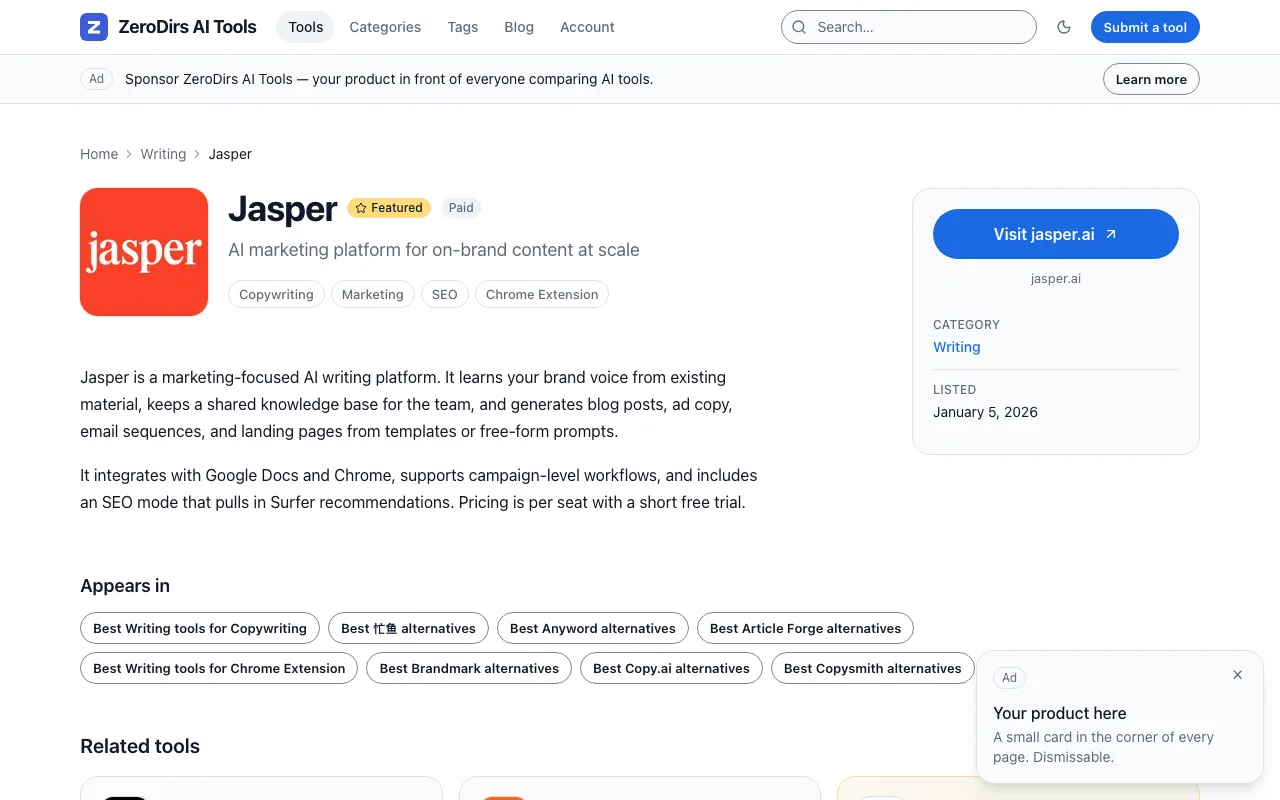
slug is the file name; id, listingId and isFeatured are computed. The body is the
description on the detail page. The demo’s own file:
---name: Jasperurl: https://www.jasper.aitagline: AI marketing platform for on-brand content at scalelogo: /logos/jasper.svgcategory: writingtags: [copywriting, marketing, seo, chrome-extension]pricingType: paidtier: featuredfeaturedUntil: 2028-06-30approvedAt: 2026-01-05popularity: 1820extra: { founded: 2021 }---Jasper is a marketing-focused AI writing platform. It learns your brand voice from existingmaterial, keeps a shared knowledge base for the team, and generates blog posts, ad copy, emailsequences, and landing pages from templates or free-form prompts.An unknown category fails the build, naming the file and the slugs it accepts:
listings › my-tool: unknown category "marketing" (slug "my-tool"); categories in site.config.ts: writing, chatbots, image-generation, codingA relative logo fails it too, under the file’s name:
Invalid string: must match pattern /^(https:\/\/|\/)/An unknown tag only warns; the tag vanishes from that listing:
listings › my-tool: unknown tag(s) "foo" filtered (slug "my-tool"; not in site.config.ts tags)pricingType and tier are unchecked in files mode; only the importer rejects them.
Logos and media says where a logo file goes and what renders
without one.
Import a spreadsheet
Section titled “Import a spreadsheet”-
Dry-run the file.
Terminal pnpm listings:import my-data.csv --dry-runCSV with a header row, or a JSON array. One verdict per row, nothing written:
listings:import — my-data.csv (csv, 3 rows) → src/content/listings (dry run)ok row 1 acme-writer.md create Acme Writerok row 2 jasper.md overwrite Jasper (1 warning)error row 3 (Zed): unknown category "marketing" (slug "zed"); categories in site.config.ts: writing, codingwarn row 2 (Jasper): unknown tag(s) "foo" filtered (slug "jasper"; not in site.config.ts tags)warn ignored column(s) not in the listing schema: Notes (use --map or an "extra.<key>" header)dry run: 2 ok, 1 error; nothing writtenHow columns are read:
Column Rule headers matched against aliases after lower-casing: Titleisname,Websiteisurl,Summaryistagline,Bodyisdescription(the Markdown body),Keywordsaretags,PricingispricingType,Planistier,Date addedisapprovedAt--map name=Product,url=Websitea header the aliases do not know; wins over them extra.founded, or a header equal to alisting.customFields[].keylands in extra; anextracolumn holding JSON is merged tooanything else ignored, named once in a warnlinename,url,tagline,categoryrequired: row 3 (Zed): missing required column "url"slugoptional; otherwise the slugified name, and a duplicate name gets-2tags, datessplit on commas, semicolons, pipes or line breaks; any date format becomes YYYY-MM-DD,approvedAtdefaulting to todaypricingType,tier,logothe contract’s rules, but here a bad value is an error -
Run it.
Terminal pnpm listings:import my-data.csvAll-or-nothing: one bad row and it prints
1 row cannot be imported; nothing was written:with the rows. When every row passes:wrote 3 files to src/content/listings (2 created, 1 overwritten)A corrected export overwrites the same files.
--out <dir>writes elsewhere first;--to d1 --remoteupserts into D1 instead. -
Check and build.
Terminal pnpm check:config && pnpm buildlistings: N (src/content/listings)from the first; the[zerodirs-files]line with the new count from the second.
Custom fields
Section titled “Custom fields”Anything in extra is carried along; a key declared in listing.customFields renders in the
facts card of the detail page, on the card with showOnCard: true, and on the submit form,
where required applies.
listing: { customFields: [ { key: 'founded', label: 'Founded', type: 'text', showOnCard: true }, { key: 'platforms', label: 'Platforms', type: 'select', options: ['Web', 'macOS', 'iOS'] }, { key: 'docsUrl', label: 'Documentation', type: 'url' }, ],},extra: founded: 2021 platforms: Web docsUrl: https://docs.acme.comA key must match ^[a-z][a-zA-Z0-9]*$ and may not shadow a
built-in listing column; type is text, url, select or
textarea, and a select needs options. pnpm check:config reports all of it by field path.
Datasets
Section titled “Datasets”seed/datasets/ holds the sample datasets — ai-tools (the demo, real products), indie-tools
and local-businesses (invented, example.com URLs) — each a directory with listings/,
blog/, logos/, categories.json, tags.json and meta.json.
pnpm content:check # is src/content still the loaded dataset?pnpm content:use local-businesses --yes # load onepnpm content:reset --yes # clear it; one example listing per categorycontent:use replaces the listings, the posts and public/logos/ with the dataset, then prints
the categories and tags blocks to paste — it never edits site.config.ts:
use: N files -> src/content/listingsuse: N files -> src/content/bloguse: N files -> public/logos…use: snippet written to seed/.out/local-businesses-config.txtnext: paste the two blocks into site.config.ts, then pnpm check:configThe snippet also lists what meta.json suggests — site.kind, routes.listingBase,
routes.listingNoun, seo.jsonLd.listing — and the CLI writes those into site.config.ts when
it scaffolds a project, which is why local-businesses comes out with /places/ URLs
(Quickstart).
content:check ends with src/content and public/logos match the ai-tools dataset., or lists
the drift and exits 1. To preview a dataset without touching src/content/:
ZERODIRS_DATASET=indie-tools pnpm buildOnly the listings glob moves — the log says listings: N from ./seed/datasets/indie-tools/listings
— while categories and tags still come from site.config.ts, so an undeclared category still
fails. Files mode only.
content:reset --yes deletes every listing, every post except the starter’s draft fixture, and
public/logos/, then writes one example listing per category from your own config, plus
hello-world.md and a pSEO example. Without --yes it refuses and says what it would delete.
Moving to the database
Section titled “Moving to the database”In D1 mode the build reads approved rows from D1 over the REST API instead of this directory,
and /submit/ and /admin/ write those rows. You need it the day an approval should appear on
the site without a commit. The move is a seed and four build variables: pnpm db:seed:remote
copies these files into D1, and pnpm listings:export brings a live database back out as the
same Markdown.
Verify
Section titled “Verify”| Where | You should see | |
|---|---|---|
| The config | pnpm check:config |
site.config.ts OK — <name> (<url>); …, then listings: N (src/content/listings); logos served directly |
| The build | pnpm build |
[zerodirs-files] listings: N from ./src/content/listings (featured N, parsed N, refreshed N) |
| A listing | pnpm preview, then /<routes.listingBase>/<file name>/ |
name, tagline, the logo or the letter tile, the body |
Configuration
Section titled “Configuration”| Field | What it changes | Reference |
|---|---|---|
routes.listingBase |
the segment before the slug in every listing URL | routes |
listing.perPage, defaultSort, relatedCount, maxTags, screenshotMax, outboundRel, customFields |
paging and sort, what the detail page shows, which extra keys render |
listing |
categories |
the only values category may take |
categories |
tags |
the values tags may take |
tags |
pricingTypes, tiers |
the values pricingType and tier should take |
pricingTypes, tiers |
Directorysrc/
Directorycontent/
Directorylistings/ one file per listing; the file name is the slug
- …
- schema.ts
listingSchema, the shape both modes end in
- content.config.ts wires the collection to
listingsLoader() Directoryloaders/
- files.ts the glob, and
ZERODIRS_DATASET - normalize.ts the category check, the tag filter,
isFeatured
- files.ts the glob, and
Directoryscripts/
- import.ts
pnpm listings:import - content.ts
pnpm content:reset,content:use,content:check
- import.ts
Directoryseed/
Directorydatasets/ the sample datasets
- …